UEToolbox is a free plugin for Unreal Engine 5 that includes a variety of features for the Unreal Editor, including a Texture Painting tool, a system for grid-based/cellular 3D modeling (“ModelGrid”), some Mesh Import/Export capabilities (quad meshes!!), helpful Blueprint nodes, and more.
UEToolbox is open-source on Github and free on Epic’s FAB Marketplace (UEToolbox Listing). The project lives on the Gradientspace website at gradientspace.com/uetoolbox.
I worked on UE Toolbox after I left Epic, releasing it at the end of 2024 (blog post). Initially I tried to sell this as a paid plugin. Unfortunately I did not manage to find any vocal early adopters to help guide my development, and I eventually had to move on from this project. I wrote a post-mortem about the project here. After I gave up, I made it free on FAB and it immediately became the highest-rated (at the time) plugin in the Modeling category. So, maybe I should have tried harder!
Some of the underlying libraries - in particular the ModelGrid representation and editing algorithms - are pure C++ and have no Unreal Engine dependencies. These parts can be used as standalone C++ libraries, and are open-source on GitHub.
The two videos below cover most of the feature set of UEToolbox.
Or if you don’t feel like watching videos, here is the gallery of marketing images I used for the FAB marketplace listing. This covers most of the main features.
Texture Painting
Texture Painting was not my initial plan for UEToolbox. However I knew it was something that UE Editor users really wanted, because when I was at Epic building Modeling Mode, I was constantly being asked for it. So I figured I would give it a shot. Although I have written multiple 3D mesh sculpting tools, and several Vertex-Painting tools, I had never actually done Texture Painting. I took an approach I think is a bit unusual. Basically, instead of trying to rasterize into images, I scattered points on the surface (basically 1 point per texel), and then did pointset-painting, mapping back to image space. It worked quite well even with 8k textures!
I also put quite a bit of effort into implementing ‘correct’ stroke/image compositing. A lot of simple texture painting demos (there are quite a few on FAB, and Epic actually has a very basic texture painting tool hidden in the UE Editor) do a very simple type of Lerp-based blending to implement painting. This is wrong, and gives a completely different behavior than (eg) a brush with soft edges in Photoshop. I implemented proper layer compositing, and even a “temporary” overlay layer, to enable all sorts of nice painting interactions (and have the foundation for actual paint layers…which I never got around to).
ModelGrid System
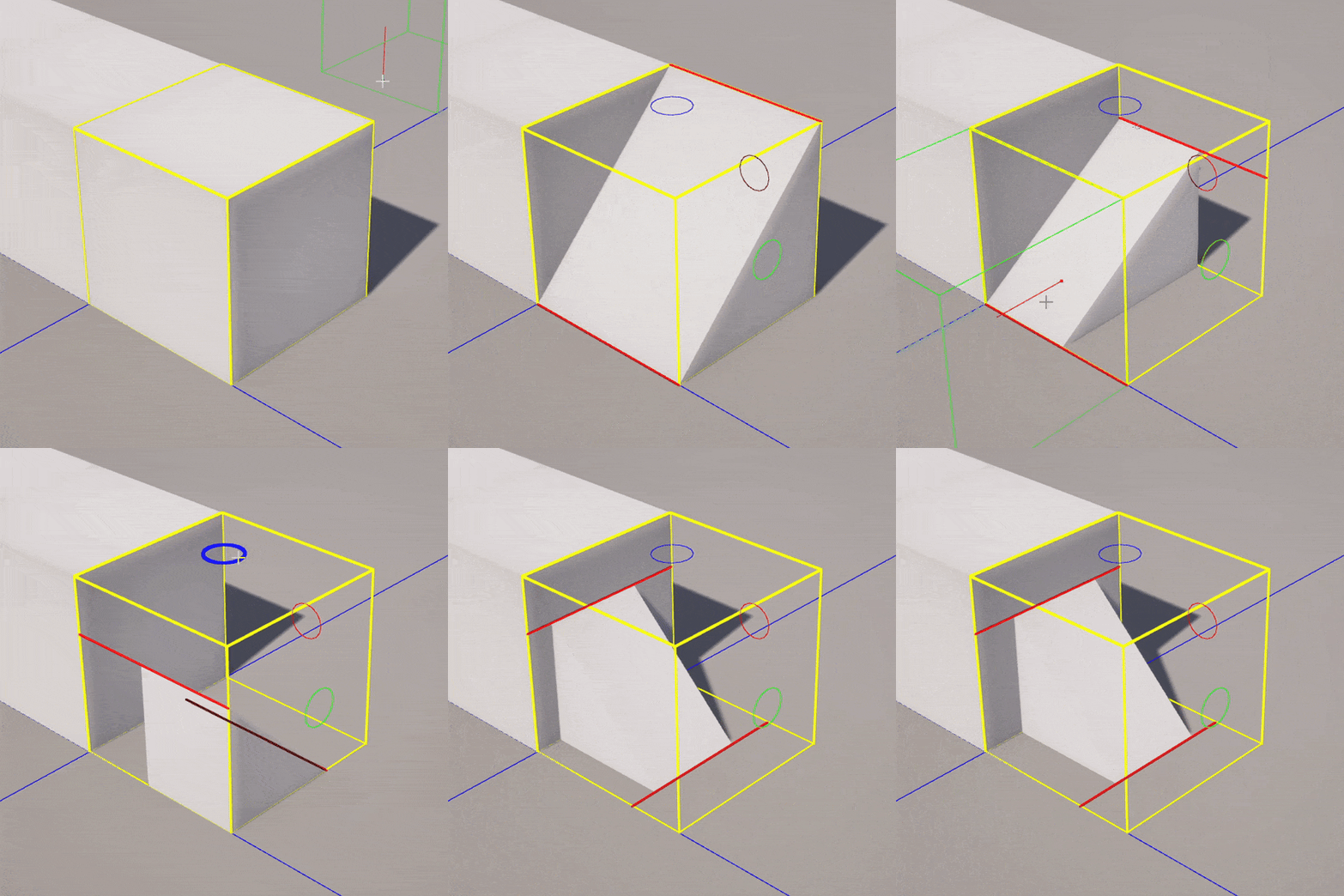
Most of the time I was working on UEToolbox, I was developing the ModelGrid system. A ModelGrid is a new type of 3D shape representation, based on a uniform grid of cells where each cell can be filled with a fixed set of parametric mesh elements. The goal is to go beyond the standard “3D voxel cubes” approach while still staying in the realm of a discretized, easily-understandable shape vocabulary that directly translates into large-scale world representation. My basic thinking was that nearly every kid growing up today has been exposed to voxel/cell-based 3D modeling via Minecraft, and there isn’t much opportunity to apply that knowledge/experience to more advanced 3D modeling. ModelGrids are much more constrained than SubD, but have vastly more shape-representation capability than cubes.
The gif on the right shows a bit of ModelGrid cell editing, where to give you a sense of the parameter space for a cell. There are 8 basic cell shapes (solid, slab, ramp, corner, cutcorner, pyramid, peak, and cylinder), and for each cell there is scale and translation along each axis, as well as a fixed set of rotations, and flips. These parameters are heavily discretized, generally 12 or 16 steps, and packed into 64 bits per cell. So you get a lot of freedom, but it’s still easily possible to look at a ModelGrid cell and know exactly how to recreate it, or exactly hit alignment with an adjacent cell. This was my big goal - balancing parametric freedom with a sufficiently-discretized design space.
I actually still think ModelGrids are pretty awesome, and could be used to good effect in the hands of the right artists. Unfortunately it’s quite hard to get people to try my ModelGrid Editor, because they have to (1) get a 30-40GB Unreal Editor installation, (2) learn how to get into Modeling Mode, and (3) go install a plugin, and then (4) learn to use my (undocumented) toolset. I had vague plans to build a standalone ModelGrid Editor (and maybe I still will, someday!). The videos below are two demos of building using ModelGrids in the UE Editor toolset.
WorldGrid
Once you have a block of cells, you just can’t help but think “what if I tiled these blocks to make a huge world”. So I spent a while playing with that, too, and built a pretty solid “WorldGrid” system. The WorldGrid is made up of procedurally-generated ModelGrid chunks, which are editable, and the performance was decent even without any serious visibility culling or other optimization. I even implemented Undo/Redo for the world editing! You can see demos of this in the clips below. Unfortunately, I just didn’t have time to take this project further, so it’s on the shelf for now.